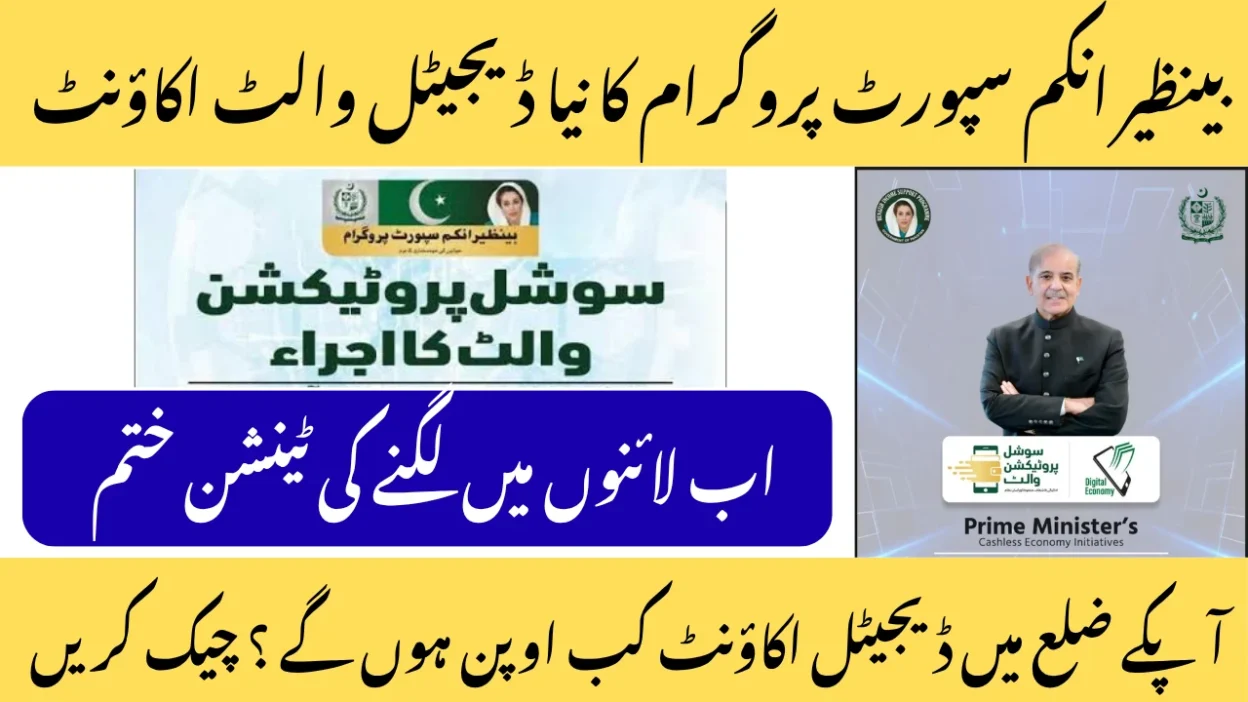
Imagine the Prime Minister himself handing you the key to a safer, easier future. That’s exactly what happened when PM Shehbaz Sharif launched the BISP SPW activation 2025 program. With one simple visit, you get a free SIM card, a digital wallet, and full control over your payments. Ready? Let’s walk through it together — step by step, just like the official SOP says.
1. From LMAs to SPW: Why Pakistan is Going Digital
Remember the old days? You’d line up at the bank, get your full BISP payment in cash through a Limited Mandate Account (LMA), and that was it. No savings. No real ownership.
Now, BISP Social Protection Wallet (SPW) changes everything. It’s your own digital wallet — linked to your CNIC and a free SIM in your name. You decide when and how much to withdraw. You can even save a little for later.
PM Shehbaz Sharif’s Vision:
“We’re building a cashless economy where every woman has dignity, security, and power over her money.”
The Ramazan Relief Package 2025 was the test run. Over 3.4 million families got aid through digital payments. No fraud. No lost cash. Just peace of mind.
Now, BISP SPW activation 2025 is rolling out to all 10 million BISP beneficiaries — that’s nearly one in four Pakistanis!
2. What is a Social Protection Wallet? (4 Core Components)
Think of SPW as your personal digital bank — but free, safe, and made just for you.
| Component | What It Means for You |
| Wallet Creation | Your CNIC becomes your account number. |
| SIM Tagging | You get a free SIM from Jazz, Ufone, Telenor, Zong, or SCO — in your name only. |
| Wallet Authentication | Withdraw with fingerprint + OTP — no one else can touch it. |
| Security Protocols | Proof of life, SIM ownership validation, and BVS Port 4 stop fraud cold. |
SPW vs JazzCash/Easypaisa?
SPW is government-backed, free, and uses biometric verification. Others charge fees and don’t have the same security.
3. Step-by-Step SIM Issuance at BTO/DRC/Campsite
How to get free SIM for BISP Social Protection Wallet? It’s easier than you think.
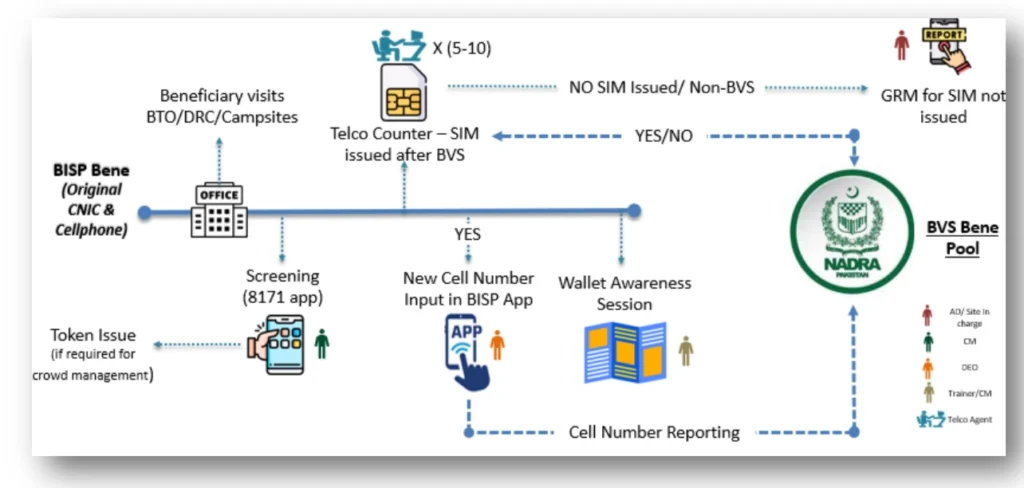
Your 5-Step Journey:
- Arrive & Get Checked
Bring your original CNIC and phone. Staff use the 8171 Screening App to confirm you’re a BISP beneficiary. Too many people? You’ll get a token. - Fingerprint Scan (Biometric Verification)
Place your finger on the NADRA BVS machine (Port 4). It checks: “Is this really you? Did you already get a SIM?” - Get Your Free SIM
A telecom agent hands you a new number — insert it and activate on the spot. - Record the Number
BISP staff enter your new cell number into the BISP SIM Reporting App — live, right there. - Learn in 15 Minutes
Join the wallet awareness session. You’ll learn SPW activation, fraud prevention, and get a free guide.
BISP SPW activation process step by step 2025 starts here — and ends with you in control.
What If You Don’t Have a Phone? (B3 Category)
No phone? No stress.
- Keep using your LMA for now
- Visit your BISP Tehsil Office and register
- You’ll get priority in Phase III
- Low-cost phones are coming — government will help
4. Who Does What? Full Stakeholder Breakdown
Everyone has a job — so nothing goes wrong.
| Team | Their Job |
| BISP | Runs the camp, checks you in, handles complaints |
| Telecom Operators | Issue and activate your free SIM |
| NADRA | Runs BVS Port 4 for fingerprint check |
| PTA | Watches SIM issuance, stops duplicates |
| Partner Banks (PFIs) | Run your SPW, link wallet, pay agents |
| SBP | Sets rules for digital payment security |
Telecom agent vs BISP staff?
- BISP staff screen and record
- Telecom agent scans finger and gives SIM
Only official centers issue SIMs. No payment. Ever.
5. How BVS Port 4 Stops Fraud
Your fingerprint goes through a secure gate called BVS Port 4 — only for BISP.
It checks:
- Proof of identity
- One SIM per person
- No fake entries
The Technology Wing runs:
- 8171 Screening App
- BISP SIM Reporting App
- Live dashboard for control room
Your Data is Safe
- Your CNIC and SIM data stay in government systems only
- Encrypted from NADRA to BISP to bank
- No third party sees it
- Every login is tracked
Report misuse? Call 8171.
6. SPW & SIM Issues? Here’s How to Fix Them
| Problem | Fix |
| SIM not issued | Call 8171 → Press 4 |
| Fingerprint failed | Visit NADRA → Update prints |
| SIM says “invalid” | Try another phone → Dial *123# |
| Wrong number saved | Go to BISP office with SIM |
Top 5 Real Complaints (2025):
- “My finger didn’t scan” → Clean it, try again
- “Agent asked for money” → Report immediately
- “No camp near me” → Check Phase III below
- “SIM not activating” → Call your telecom helpline
- “I wasn’t on the list” → SMS CNIC to 8171
7. When & Where is SPW Coming to Your Tehsil?
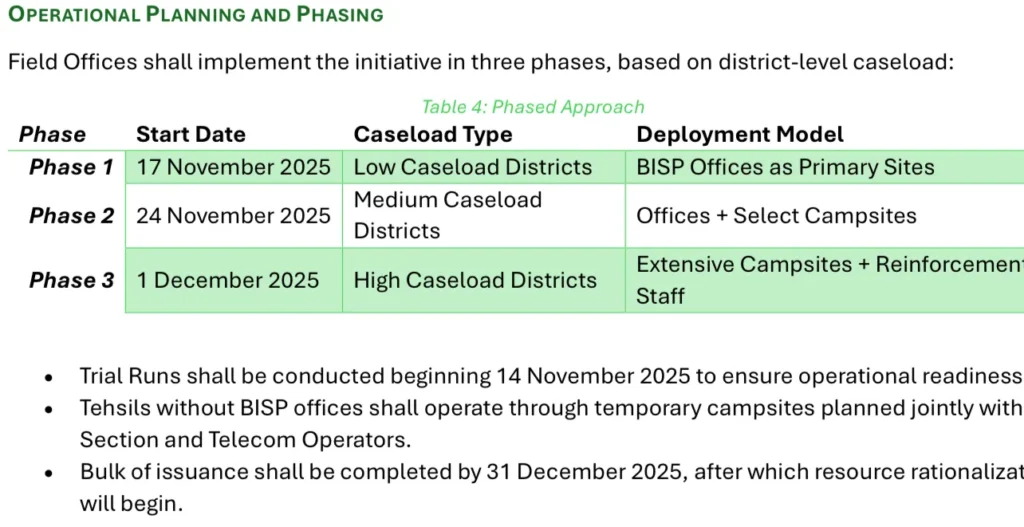
Phased Rollout (Official SOP – Annex I)
| Phase | Date | Who |
| Phase I | 17 Nov 2025 | Low caseload tehsils |
| Phase II | 24 Nov 2025 | Medium (1,000–5,000) |
| Phase III | 1 Dec 2025 | High caseload |
Sample Tehsil List (Full in SOP PDF)
| Province | Phase I (17 Nov) | Phase II (24 Nov) | Phase III (1 Dec) |
| Punjab | Rajanpur, Muzaffargarh | Layyah, Bhakkar | Lahore, Faisalabad, Multan |
| Sindh | Tharparkar, Umerkot | Jacobabad, Shikarpur | Karachi, Hyderabad, Sukkur |
| KP | Upper Dir, Lower Dir | Bannu, Lakki Marwat | Peshawar, Mardan |
| Balochistan | Awaran, Washuk | Kech, Panjgur | Quetta, Zhob |
| AJK | Bhimber | Kotli | Muzaffarabad |
| GB | Hunza | Gilgit | Skardu |
Find your camp: SMS “TEHSIL [Your Tehsil]” to 8171
8. After December: Payment Site Activation
| You Have | Next Step |
| Phone + SIM (B2) | Direct BVS + OTP activation |
| Phone, no SIM (B1) | Get SIM first |
| No phone (B3) | Keep LMA → Transition later |
Can you still use LMA after 2025?
Yes — but only until 2026. After that, SPW only.
9. Your SPW Survival Guide
Bring:
- Original CNIC
- Your mobile phone
- Water, umbrella, patience
Never:
- Pay for SIM
- Share OTP
- Trust unofficial agents
Helpline: 8171 (24/7)
Complaint SMS: COMPLAINT [CNIC] [Issue]
Special Help for Disabled & Elderly:
- Wheelchair entry
- Priority line
- Home visits (apply via 8171)
- Family can help with permission
10. Beyond 2025: What’s Next?
Your BISP digital wallet is just the start.
| Coming Soon | When |
| Pay bills via SPW | 2026 |
| Save with profit | 2026 |
| Micro-loans | 2027 |
| Health insurance | 2028 |
SPW = Your Financial Future
Savings. Loans. Insurance. All in one wallet.
11. BISP Social Protection Wallet Activation FAQs
How to activate BISP SPW with biometric verification?
→ Get SIM → Next payment uses BVS + OTP
BISP free SIM issuance process for women beneficiaries?
→ Same for all — just bring CNIC
SIM not issued? BISP grievance?
→ Call 8171 → Press 4
How to link CNIC with free SIM for Social Protection Wallet?
→ Done automatically at camp
Can I change my SIM later?
→ Yes — visit BISP office
Your Action Plan Today
- SMS CNIC to 8171 → Check if you’re ready
- Find your camp date (above)
- Bring CNIC + phone
- Get free SIM
- Activate SPW next payment
You’re now part of Pakistan’s digital revolution.
Share this with your sisters, mothers, neighbors.
Tag @officialbisp when you activate!
For more information, please visit our website Bispwallat.com