This complete 2025 guide explains the BISP 13500 in SIM Account registration process step-by-step. Learn how to register via 8171, JazzCash, EasyPaisa, and agents with easy tips, FAQs, and troubleshooting.
Think of it like this:
👉 BISP needs to know which phone number is yours, so they can send your payments safely.
This guide will walk you through every single step, explain the problems people face, and show you how to fix them. By the end, you’ll know exactly what to do to get your BISP money directly on your phone.
What is the BISP Digital Wallet?
The Benazir Income Support Programme (BISP) is giving out money to help families in Pakistan. Before, people had to go stand in line, wait for hours, and collect cash at a camp.
Now, the government wants to make it easier and safer. So they started the digital wallet system.
That means:
- Your BISP money goes directly into your mobile account.
- You can use EasyPaisa, JazzCash, HBL Konnect, or partner wallets.
- You can withdraw money from any agent shop, bank, or even use it online for payments.
- For more information must visit State Bank of Pakistan – Digital Wallet Policy
👉 But for all this to work, your mobile number must be registered with BISP.
Why Do You Need to Register Your Mobile Number?
Here’s why mobile registration is important:
- BISP must confirm your CNIC + mobile number.
- Payments will only go to the mobile number that is registered.
- Without registration, you won’t get the money in your wallet.
- If the SIM is not in your name, you’ll need biometric verification.
- Also get more related information from Dawn News – Digital Wallet Rollout
Quick Checklist (Before You Start)
Make sure you have:
- ✅ Your 13-digit CNIC number (no dashes).
- ✅ A working mobile SIM (preferably in your name).
- ✅ Some balance for SMS if you’re using 8171.
- ✅ Internet (if using the portal or wallet app).
- ✅ Installed app (EasyPaisa / JazzCash / HBL Konnect).
- ✅ Original CNIC (for KYC or agent visit).
Ways to Register Your Mobile Number for BISP
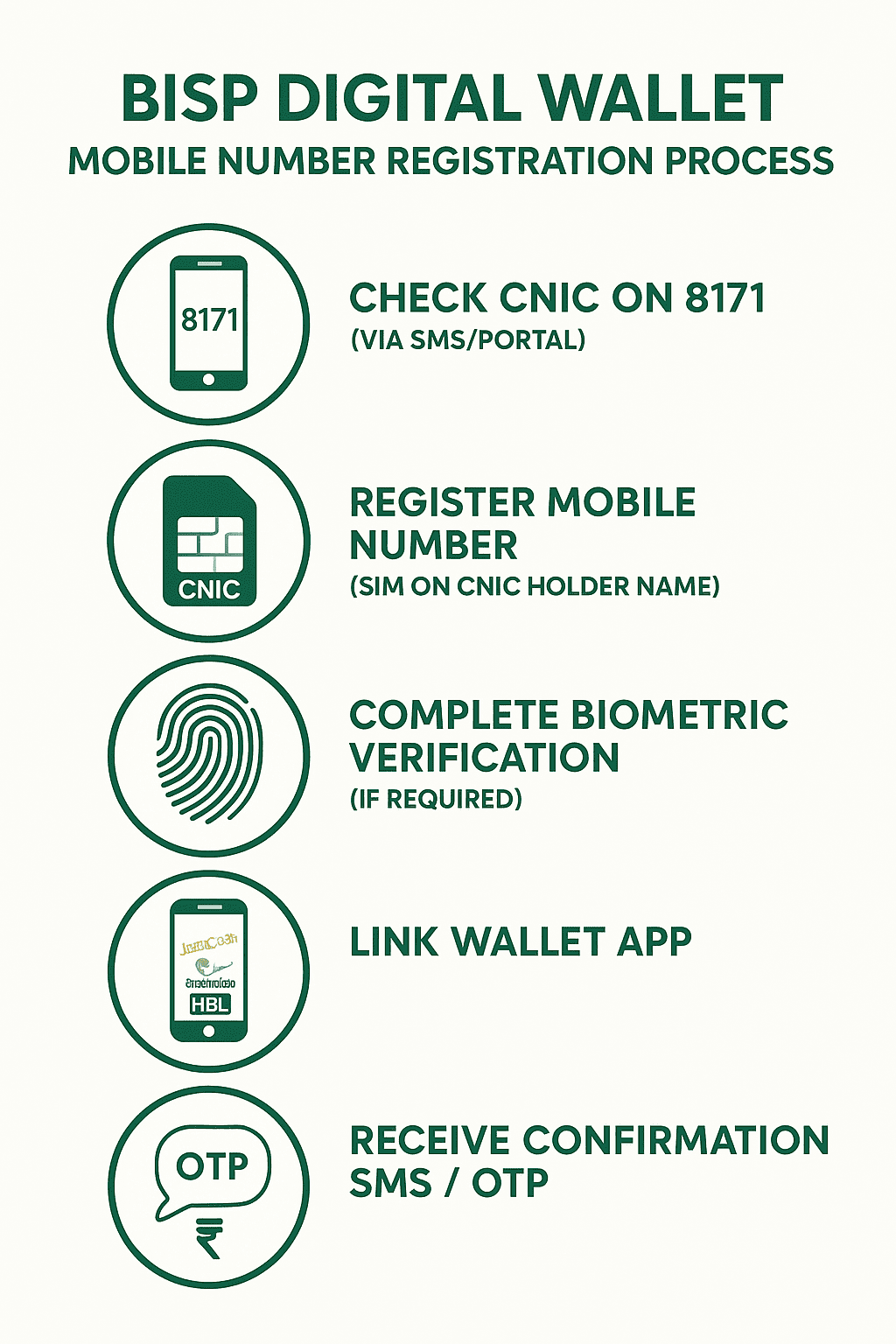
You can register your mobile number in 3 main ways:
Method 1: 8171 Portal / SMS (self-service)
Fastest way if your CNIC is already in the BISP database.
Method 2: Wallet Apps (EasyPaisa, JazzCash, HBL Konnect)
Register directly through your mobile wallet app.
Method 3: BISP Camp or Agent (biometric KYC)
If your SIM is not in your name or online registration fails.
Step-by-Step: Register via 8171 Portal
Portal Method (using internet):
- Go to the official 8171 portal.
- Enter your CNIC + captcha.
- Click on Check Status / Register Mobile.
- If your number isn’t linked, you’ll see an option to Add Mobile Number.
- Enter your mobile number.
- You’ll get an OTP SMS. Enter it on the portal.
- Done! Your number is now registered.
Step-by-Step: Register via SMS
SMS Method (no internet):
- Open your SMS app.
- Type your 13-digit CNIC.
- Send it to 8171.
- Wait for a reply. It will tell you if:
- You are eligible.
- Your mobile number is linked.
- Or if you need to register at a camp.
👉 If it asks for mobile registration, follow the SMS instructions.
Step-by-Step: Register via Wallet Apps
Example with EasyPaisa (works similar for JazzCash/HBL Konnect):
- Install EasyPaisa app.
- Open account with CNIC + mobile number.
- Upload CNIC photo OR go to an agent for biometric.
- Complete KYC verification.
- Open app → Go to Government Payments → Select BISP.
- Enter your CNIC to link.
- Wait for SMS confirmation.
👉 Same process works for JazzCash and HBL Konnect.
What If Your SIM is Not in Your Name?
- You must visit a mobile operator office (Jazz, Telenor, Zong, Ufone) and re-register the SIM with biometric.
- Or, go to a BISP camp/agent, take your CNIC, and register there.
- In most cases, payments are only allowed on the woman beneficiary’s SIM.
How to Use Your Wallet (After Registration)
Once your mobile is linked, you can:
- Withdraw cash at JazzCash / EasyPaisa agents.
- Pay bills, recharge, or buy groceries.
- Save money in the wallet for later.
- Get SMS whenever BISP sends money.
Troubleshooting (Common Problems & Fixes)
| Problem | Fix |
| Didn’t get SMS after sending CNIC to 8171 | Check balance, resend, try portal, or visit BISP center |
| Wallet not showing BISP payment | Wait 24 hrs, check CNIC link, contact wallet support |
| Payment sent to wrong number | Call BISP helpline immediately |
| SIM not in your name | Re-register SIM at mobile operator office |
| OTP not received | Check network coverage, SIM balance, restart phone |
FAQs – BISP digital wallet mobile number registration process
Registration & Process Questions
Aap apna mobile number BISP digital wallet ke saath register karne ke liye 8171 portal ya SMS ka istemal kar sakte hain. Pehle apna 13-digit CNIC bheje, phir OTP confirm kar ke mobile link karein. Agar SIM apke naam pe nahin hai, to agent/camp visit required hogi.
A2: Sirf apna 13-digit CNIC likhein (without dashes or spaces) aur send karein 8171 par. Example: 1234512345678.
A3: Agar sab sahi hai to portal/SMS registration instantly hoti hai. Biometric or agent process mai 1–2 din lag sakte hain.
2. Mobile SIM & KYC Issues
A4: Haan, lekin aapko SIM apne naam pe karani hogi ya BISP camp/agent visit karke biometric verification karwana hoga.
A5: Original CNIC aur active mobile SIM required hai. Wallet apps kabhi CNIC photo ya biometric verification bhi demand karte hain.
A6: Naya mobile number update karne ke liye BISP office/Tehsil center visit karein aur CNIC ke sath request submit karein.
Troubleshooting & Payments
A7: Apna network aur SIM balance check karein. Dubara try karein. Agar issue solve na ho to BISP helpline ya nearest center contact karein.
A8: OTP na aane ka reason ho sakta hai network issue, inactive SIM ya server busy. Dubara try karein ya wallet support se contact karein.
A9: EasyPaisa, JazzCash, HBL Konnect aur kuch bank wallets BISP ke sath partnered hain. Official BISP site check karein latest list ke liye.
A10: Nahin, paisay sirf us mobile wallet mai ayenge jo apke CNIC ke sath linked hai. OTP ya wallet credentials kisi ke sath share na karein.
Final Note
👉 Want to check your eligibility or register now? Visit the official 8171 BISP portal today and complete your BISP digital wallet mobile number registration to receive payments directly and securely.