
Discover exactly how to open BISP Digital Mobile Account *2262# in under 5 minutes from home – no agent, no biometric, full payment straight to your phone!
What is a BISP Digital Mobile Account (DMA)?
The BISP Digital Mobile Account (also called Digital Wallet or DMA) is a branchless banking wallet launched by the Benazir Income Support Programme in collaboration with the State Bank of Pakistan and leading mobile operators (Jazz, Telenor, Ufone, Zong).
It allows registered and even unregistered BISP beneficiaries (especially women) to instantly open a Level-0 or Level-1 digital wallet using only their CNIC and the USSD code *2262# — without visiting any bank or biometric center.
As of November 2025, more than 9.3 million women have opened DMAs under this initiative.
Why the Government Launched the Digital Mobile Account
The core objectives are:
- Achieve 100 % financial inclusion of BISP’s 9+ million families
- Reduce cash leakage and ghost beneficiaries
- Empower women with direct control over their stipends
- Cut down disbursement cost (from ~PKR 80 to
- Promote digital Pakistan vision under the Ehsaas/BISP umbrella
Key Benefits of BISP DMA in 2025
| Benefit | Description |
| Instant opening | Takes 2–4 minutes, no paperwork |
| Zero account opening fee | Completely free |
| Direct stipend credit | Kafalat, Nashonuma, Taleemi Wazaif payments come straight to your phone |
| Nationwide utility bill payment | Electricity, gas, water, internet bills |
| Mobile top-up | All networks |
| Money transfer | To any CNIC or mobile wallet (limits apply) |
| QR payments | At thousands of retailers |
| ATM withdrawal | Via 1Link & MNet ATMs (biometric required for higher limits) |
| Women empowerment | Account is opened in woman’s own name and CNIC |
Eligibility Criteria (Updated 2025)
You can open the account if you fulfill ANY one of these:
- Already registered BISP beneficiary (Kafalat, Nashonuma, Taleemi Wazaif)
- Unregistered woman whose PMT score is likely ≤32 (system auto-checks)
- Wife/daughter/mother of a registered male beneficiary
- Any Pakistani woman aged 18+ with valid CNIC (even if not yet surveyed)
Documents Required
Only two things:
- Original CNIC (or knowledge of 13-digit number + issuance date)
- Any active SIM (Jazz, Telenor, Ufone, Zong) registered against the same CNIC
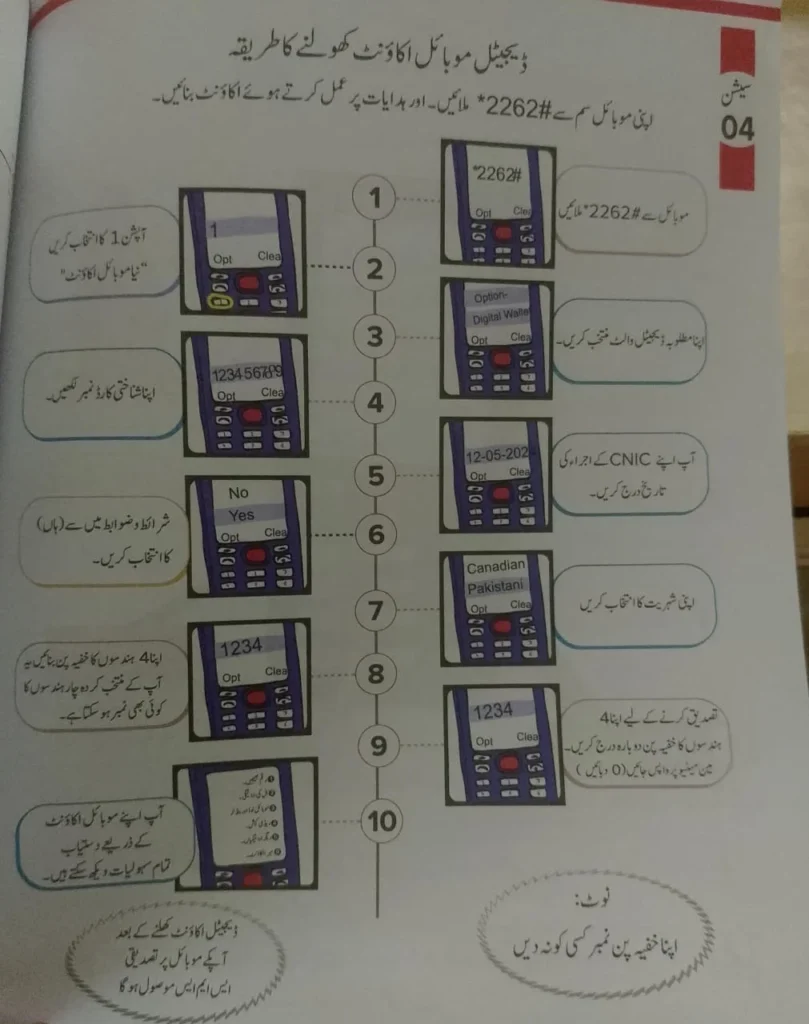
Detailed Step-by-Step Guide: How to Open BISP DMA Using *2262#
Follow this exact process (tested November 2025):
- *Dial 2262# from your mobile (any network).
- A welcome message in Urdu/English appears. Press reply → type 1 and send (for “Digital Wallet / Digital Account”).
- Enter your 13-digit CNIC number without dashes → Send.
- Enter your CNIC issuance date exactly as written on your card (format: DD-MM-YYYY).
Example: If issued on 15 March 2023 → type 15032023 - System asks: “Kya aap Pakistani hain ya dual nationality rakhti hain?”
→ Reply 1 for Pakistani, 2 for dual national/overseas. - Select your nationality from the list (usually type 1 for Pakistan).
- Create a 4-digit secret PIN (this will be your transaction password).
Example: 4587 - Re-enter the same 4-digit PIN to confirm.
- You will receive an SMS within 10–60 seconds:
“Congratulations! Your BISP Digital Mobile Account has been created successfully. Your account number is 03XXXXXXXXX.”
That’s it — your wallet is ready!
Common Errors & Instant Fixes
| Error Message | Cause | Solution |
| “Invalid CNIC issuance date” | Wrong format or typo | Type date exactly as DDMMYYYY (no dashes) |
| “SIM not registered against this CNIC” | SIM belongs to husband/son | Insert SIM issued in your own name |
| “Maximum limit reached” | Already have 3 branchless accounts | Close one old wallet first |
| “Technical error. Try later” | Network or NADRA downtime | Wait 30–60 mins or try after 10 PM |
Transaction Limits and Charges
| Transaction Type | Daily Limit | Monthly Limit | Charges |
| Incoming BISP payments | Unlimited | Unlimited | Free |
| Bill payment & mobile top-up | PKR 50,000 | PKR 200,000 | Free |
| Send money to CNIC/mobile account | PKR 50,000 | PKR 200,000 | PKR 10–60 (slab-based) |
| ATM withdrawal (biometric) | PKR 50,000 | PKR 400,000 | 2 % or min PKR 50 |
How to Receive BISP Payments Directly
Once your DMA is active:
- BISP automatically routes your quarterly Kafalat (PKR 10,500–13,500), Nashonuma, and Taleemi Wazaif payments to this wallet.
- You receive SMS alerts from 9188 and 2262 both.
- No need to visit camps or retailers anymore.
Security Best Practices (Expert Tips)
- Never share your 4-digit PIN with anyone — not even BISP helpline.
- Do not save PIN in mobile notes.
- Change PIN every 90 days (dial *2262# → 5 → Change PIN).
- If phone is lost, immediately call 051-9214503 (BISP helpline) to block wallet.
- Enable biometric login (fingerprint) when prompted — it adds another layer.
BISP DMA vs Other Mobile Wallets (2025 Comparison)
| Feature | BISP DMA | JazzCash | Easypaisa | SadaPay/NayaPay |
| Account opening fee | Free | Free | Free | Free |
| Must visit agent/biometric | No | Yes (Level-1) | Yes (Level-1) | Yes |
| Dedicated for BISP payments | Yes | No | No | No |
| Women-only naming | Yes | No | No | No |
| Max balance limit | PKR 400,000 | PKR 500,000 | PKR 500,000 | PKR 800,000 |
Statistics: Digital Transformation of BISP
| Year | Women with Digital Wallets | % of Total Beneficiaries | Amount Disbursed Digitally |
| 2023 | 1.8 million | 19 % | PKR 68 billion |
| 2024 | 6.2 million | 67 % | PKR 312 billion |
| 2025 | 9.3+ million | 94 % | PKR 490+ billion (projected) |
(Source: BISP Board Meeting Minutes – Oct 2025)
Expert Tips to Get Activated in Under 5 Minutes
- Keep CNIC in hand before dialing.
- Use the SIM registered in your own name (check by dialing *2262# first — if it says “already registered”, proceed).
- Dial after 9 PM or before 8 AM — less NADRA load, instant approval.
- If issuance date is forgotten, check the back of your CNIC or call NADRA helpline 7000.
Frequently Asked Questions (FAQs)
Q1. Can men open BISP Digital Mobile Account?
No. It is exclusively for women beneficiaries or potential women beneficiaries.
Q2. I am already getting payment from Easypaisa. Can I switch to DMA?
Yes. Just open DMA via *2262#. Next tranche will automatically come to new wallet.
Q3. What if my CNIC is expired?
Renew it first. Expired CNICs are not accepted.
Q4. Is there any monthly fee?
Absolutely zero maintenance fee.
Q5. Can I link my DMA to a bank account?
Not yet, but IBFT outward is expected in Q1 2026.
Q6. How to check balance?
Dial *2262# → 3 → My Account → Balance Inquiry (free).
Final Thoughts
Opening a BISP Digital Mobile Account via *2262# is hands-down the fastest and most empowering way for Pakistani women to gain financial independence in 2025. It takes less than 5 minutes, costs nothing, and puts government assistance directly into your own hands — literally on your phone.
Call-to-Action:
Take out your phone right now → Dial *2262# → Follow the 9 simple steps above → Get your own Digital Mobile Account today!
If you face any issue, drop your query in the comments below or call BISP helpline 0800-26477 (free).


